Retrofitting Home Lighting for Low Vision: 7 Practical Steps
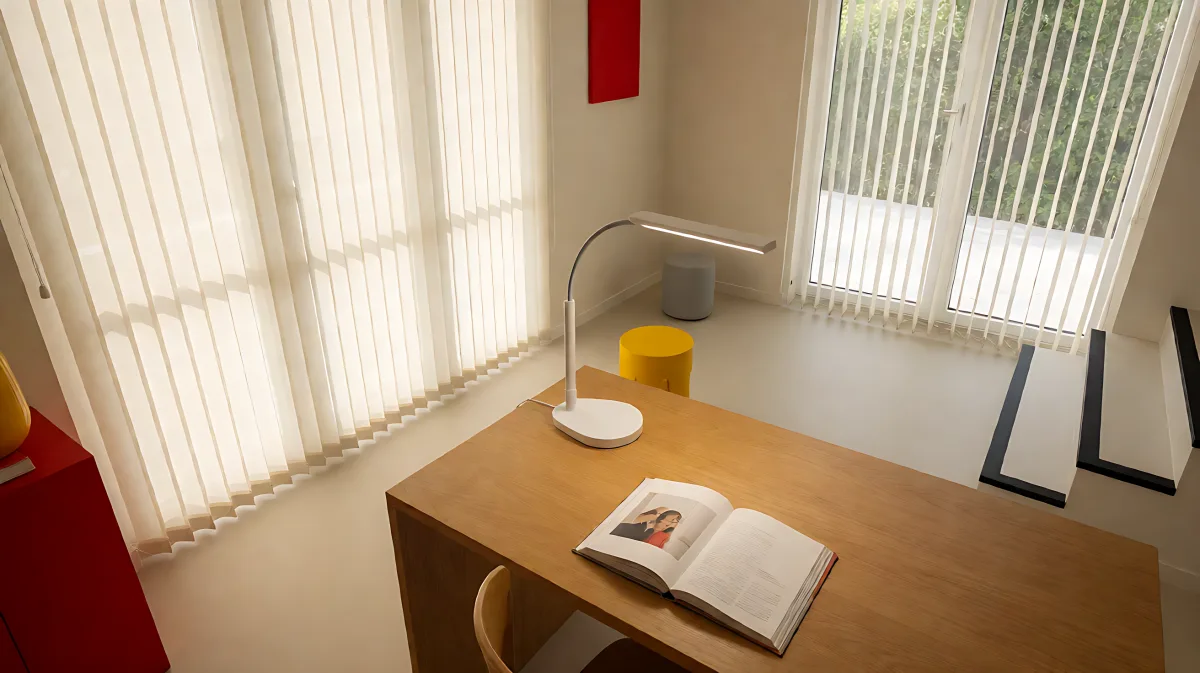
Adjusting your home's lighting and layout can dramatically improve independence for those with low vision. From using high-lumen LED task lamps to implementing smart voice controls, these practical modifications enhance safety and clarity without requiring a full renovation.
Adjusting your home's lighting and layout can dramatically improve independence for those with low vision. By maximizing light quality, minimizing glare, and utilizing modern LED technology, you can enhance your ability to read, cook, and move safely. This guide outlines specific, cost-effective modifications to help you create a clearer, more accessible living environment.
Why Is Specialized Lighting Critical for Low Vision?
For individuals with visual impairment, lighting is not just about seeing; it is about maximizing the remaining vision. According to the National Eye Institute, over four million Americans aged 40 and older live with visual impairment. As vision declines, the amount of light required to perform everyday tasks increases significantly. While a sighted young adult might function well in moderate lighting, a person with low vision may require up to six times the light intensity to achieve the same level of visual clarity and contrast. This means that standard home lighting, which is often dim and designed for comfort rather than utility, can actually hinder independence and increase the risk of accidents.
How Should You Master Natural and Artificial Light?
Natural sunlight is the most effective light source because it offers a full spectrum of visible colors. However, it is unpredictable. A passing cloud can cause sudden changes in intensity, which can be painful or confusing for light-sensitive eyes. To master this, you must actively control your windows. Install adjustable vertical blinds or sheer panels to filter intense rays without creating total darkness. Position your workspace so that you are working with your back to the window. This prevents light from reflecting off your task surface directly into your eyes. Furthermore, keep windows clean to maximize light transmission and use blue-blocker lenses in your eyewear to reduce glare and improve contrast.
Which LED Specifications Should You Prioritize?
When retrofitting your home with artificial lighting, Light-Emitting Diode (LED) technology is the preferred choice. LEDs offer instant brightness, energy efficiency, and precise control. To choose the right bulbs, you must understand three key specifications: lumens, color temperature, and the Color Rendering Index (CRI). Lumens measure the total light output; for low vision, higher lumen counts are essential. Do not rely on wattage, which only measures energy use. Instead, look for bulbs with a higher lumen rating. Color temperature, measured in Kelvin, affects how the light appears. Specialists generally recommend a neutral or cool white range of 3500K to 5000K for task areas. This range mimics natural daylight and enhances contrast. Finally, the Color Rendering Index indicates how accurately colors appear under that light. Always select bulbs with a CRI of 80 or higher, and ideally 90, to ensure colors are vivid and distinct, which is vital for distinguishing objects.
| Specification | Low Vision Recommendation | Reason |
|---|---|---|
| Lumens | High output (600 lm or more for main lights) | Compensates for visual acuity loss |
| Color Temperature | 3500K to 5000K (Cool/Neutral White) | Enhances contrast and mimics daylight |
| CRI | 90 or higher | Ensures accurate color differentiation |
| Wattage | Ignore for brightness; check max fixture limit | Wattage only indicates energy, not light |
What Are the Best Strategies for Controlling Glare?
Glare is the enemy of low vision. It occurs when light is too bright or reflects off shiny surfaces, causing discomfort and visual obstruction. You can reduce glare by choosing matte finishes for your floors, paint, and countertops. Replace high-gloss enamel with flat paint and avoid waxing hard floors, as the shine will reflect light unevenly. In your kitchen and living areas, use dimmer switches to adjust the intensity of your LED ambient lighting. If you use mirrors, position them so they do not reflect direct light into your eyes. Additionally, consider using window tinting or anti-glare films to manage the direction of incoming sunlight. By managing these reflective surfaces, you create a more comfortable visual environment that reduces eye strain.
How Can You Optimize Task Lighting for Precision Work?
General room lighting provides a safe path, but task lighting provides the focused power needed for detail-oriented activities like reading, writing, or cooking. The Inverse Square Law states that light intensity decreases as the distance from the source increases. Therefore, position your light source as close to the task as possible. Use adjustable task lamps with a flexible neck that allows you to direct the beam exactly where you need it. If you are right-handed, place the lamp on your left side to prevent your hand from casting a shadow on your work. Ensure the bulb is recessed into the shade so that you are looking at the task, not the light source. Combine this directed light with general room lighting to maintain an even level of illumination and prevent dangerous shadows when you look up or move.
Which Smart Technologies Enhance Independence?
Modern smart home devices can significantly reduce the need for visual scanning and manual adjustments. Voice assistants, such as those built into smart speakers from major technology companies, allow you to control lights, thermostats, and locks using only your voice. For example, you can command a smart bulb to increase brightness in the kitchen or set a timer for cooking without needing to read a small screen. When selecting these devices, prioritize compatibility with both major voice ecosystems to future-proof your setup. Look for products with simple, clearly labeled apps for family caregivers. Additionally, consider accessible video doorbells that send alerts to your smartphone and allow two-way audio. This lets you know who is at the door without needing to see the intercom screen. Many of these systems can also chime on a smart speaker, providing an audio cue that is independent of visual confirmation.
What Non-Lighting Modifications Support Visual Safety?
Lighting is only part of the equation; visual clarity depends on contrast and organization. Use high-contrast colors to mark key areas. For instance, apply bright yellow or white tape to the leading edge of stair nosings to make each step clearly visible. Paint doorframes in bold colors to help identify entrances. In the kitchen, use a dark cutting board on a light counter or vice versa to make food items stand out. Use large-print or tactile labels on medications and appliance controls. A black permanent marker works well for creating readable, high-contrast labels. To prevent confusion, maintain a consistent organization system. Assign a dedicated, permanent spot for frequently used items like keys, remotes, and glasses. Use texture to identify items by touch, such as placing an egg carton in a specific drawer for jewelry. These tactile cues and visual contrasts work together to reduce the cognitive load of navigating your home.
How Much Does a Basic Retrofit Cost?
A basic lighting and safety retrofit is more affordable than many people assume. Upgrading bulbs and fixtures typically costs between $100 and $500. High-contrast stair nosing tape ranges from $15 to $40. A pack of four motion-activated nightlights costs $20 to $60. If you include a smart speaker for voice control, expect to spend an additional $120 to $200. The total estimated cost for a comprehensive basic modification package is approximately $285 to $900. These investments are often outweighed by the increase in safety and independence they provide.
Which Resources Can Assist with Implementation?
You do not have to navigate these changes alone. The American Foundation for the Blind offers extensive product reviews and guides. Many state services for the blind provide free in-home assessments and adaptive technology referrals. Organizations like the Lions Club also provide low-cost vision aids. If you are a veteran, the Department of Veterans Affairs offers specialized visual impairment services. Start by contacting your local Area Agency on Aging or a local low-vision rehabilitation center to assess your specific needs.
Frequently Asked Questions
What is the difference between low vision and legal blindness?
Low vision refers to visual impairment that cannot be fully corrected with standard glasses, contact lenses, or surgery, but the person still has usable vision. Legal blindness is a medical or legal definition, typically defined as visual acuity of 20/200 or worse in the better eye with best correction. Most people with legal blindness still retain some usable vision, which is why lighting and contrast modifications remain critical for their safety and independence.
Can I use my smartphone to improve my lighting setup?
Yes. You can use your smartphone’s flashlight as a high-lumen, portable light source for tasks. Additionally, many phones have built-in magnification features that can be paired with the screen’s light to enlarge and illuminate text. However, for permanent home solutions, dedicated smart bulbs controlled by voice are more effective and require less manual interaction.
Are motion-sensor lights effective for low vision?
Yes, motion-sensor lights are highly effective because they eliminate the need to find a switch in a dark room. They are particularly useful in hallways, staircases, and bathrooms for nighttime safety. They provide immediate, hands-free illumination when you approach, reducing the risk of trips and falls caused by navigating in the dark.
How do I choose the right color temperature for my home?
For task areas like kitchens, workstations, and reading nooks, choose a cool or neutral white light in the range of 3500K to 5000K. This range enhances contrast and visual acuity by closely mimicking natural daylight. For relaxation areas like bedrooms, you may prefer a warmer white light (2700K–3000K) to create a cozy atmosphere, but be aware that you may need to increase the brightness (lumens) in these areas to compensate for the lower intensity of warm light.