Medical Command Center for Small Spaces: Setup Guide
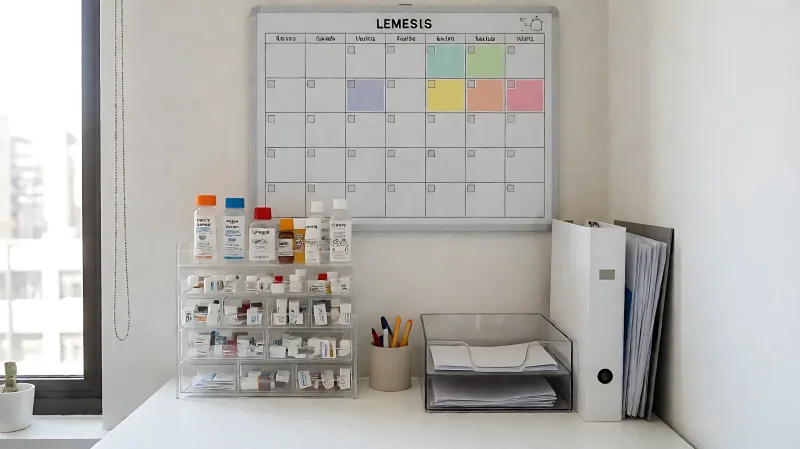
Transform a small corner of your home into a vital health hub. This guide covers selecting the right spot, organizing medications, and tracking appointments efficiently.
A small-apartment medical command center is a designated, accessible zone that consolidates medications, appointment schedules, and health records into one manageable spot. To set one up effectively, choose a well-lit location near your entry point, utilize vertical space with magnetic boards or shelves, and centralize physical documents like insurance cards and medication lists alongside digital reminders.
Where should you place a health hub in a compact living space?
In a small apartment, space is a premium resource. The key is finding a location that is accessible but does not dominate the room. For many, the ideal spot is an end table near the sofa, a corner of a home desk, or a small section of the entryway wall. The area must be well-lit, either by natural light from a window or by a focused lamp, to ensure readability of small text on prescriptions and calendars. Accessibility is crucial; the setup should be within easy reach without requiring the use of a step stool, which is particularly important for older adults or those with mobility challenges. Avoid placing the hub in high-traffic zones where it might be accidentally knocked over, but keep it visible enough that you will not forget it.
How can you maximize vertical space?
When floor space is limited, move the command center up the walls. Magnetic painting, a method popularized by home organization experts, allows you to turn a standard wall or even the inside of a cupboard door into a magnetic surface. This is perfect for holding small metal-backed calendars, magnetic medication alerts, or key holders for medical ID bracelets. Hanging organized mail trays and corkboard sections on the side of a refrigerator or inside a closet door can also create a dedicated zone that is functional yet hidden from guests, maintaining the aesthetic of a small apartment.
How do you organize medications safely and effectively?
Medication management is the core of this system. If you take multiple prescriptions, a standard weekly pill organizer with compartments labeled by day and time is the first step. For those who frequently miss doses or have cognitive concerns, an automated pill dispenser is a superior option. These devices release medication at pre-programmed times and often include a digital display or an app notification. Before buying, research specific models to ensure they fit your routine and the size of your pills. Once selected, the organizer should sit prominently in the hub. It is also wise to keep a physical list of all current medications, dosages, and prescribing doctors in a dedicated folder nearby, as this serves as a backup if you cannot access your phone or the digital app.
What role do digital reminders play?
Physical organizers work best when paired with digital backups. Smartphone voice assistants, such as Google Assistant, offer convenient ways to schedule reminders without manual entry. You can use voice commands to set alerts for medication times or to schedule appointments directly into your digital calendar. This dual approach ensures that if one system fails, the other provides a safety net. For families, coordinating via shared digital calendars helps ensure that caregivers or partners are aware of upcoming medical needs.
What documents belong in a central medical binder?
A physical binder is essential for quick reference, especially in emergency situations. This document holder should be kept in the hub and updated regularly. Essential items to include are:
- A comprehensive list of current medications and supplements.
- Records of chronic conditions, allergies, and past surgical procedures.
- Recent test results and vaccination history.
- Emergency contact information and advance healthcare directives.
- Insurance cards and identification.
Consider creating a separate, smaller "go bag" version of this binder for emergencies. This travel-ready folder should contain the most critical information, such as allergies and current medication lists, so it can be grabbed quickly if you are rushed to a hospital. While the full binder stays in the apartment, the go bag ensures that vital data is always portable.
How do you track appointments without clutter?
Use a large, visual calendar as the centerpiece of the hub. A wall-mounted dry-erase or magnetic calendar allows for at-a-glance visibility. Color-code different types of appointments to distinguish between routine checkups, specialist visits, and medication refills. When a doctor’s office calls to schedule a visit, immediately write the date on the physical calendar rather than relying solely on a phone app. This creates a tangible record that cannot be forgotten due to a dead battery or a missed notification. Include non-medical health-related tasks, like annual screenings or flu shot reminders, to ensure no time-sensitive care is missed.
How do you manage mail and paperwork in a small space?
Mail is a constant source of clutter in any home. Integrate a sorting system directly into the command center. Use labeled bins or trays to separate incoming health-related mail from general bills. Place these directly in the hub so that appointment confirmations, lab results, and insurance statements are sorted immediately upon opening. Digital scanning is a useful strategy to reduce paper volume. If you have a scanner or a high-quality document app, scan important records into a secure digital folder and then shred the physical copy. This keeps the physical binder organized while maintaining a digital backup.
What routine maintenance is required?
A command center only works if it is current. Establish a weekly or bi-weekly ritual to update the system. After each medical appointment, file new paperwork into the binder. If a medication is discontinued or a new one is added, update the medication list and the pill organizer immediately. Review the calendar to check for upcoming appointments that require preparation, such as fasting for a blood test. Regular maintenance ensures that the hub remains a reliable source of truth rather than a dusty storage unit.
FAQ
What is the best location for a medical command center in a studio apartment?
In a studio apartment, utilize the back of the front door, a section of a wardrobe wall, or a compact wall niche above the sofa. The goal is to keep it within sight while using vertical space to minimize floor footprint.
Do I need a digital pill dispenser if I have a good memory?
While a manual organizer may suffice if you are disciplined, a digital dispenser provides a secondary layer of security. It is recommended for anyone managing complex polypharmacy regimens or those who have experienced missed doses in the past.
How often should I update my medical binder?
Update the binder immediately after any medical appointment where new information is provided, such as new test results or medication changes. A general review every three months is a good habit to ensure all contact details and insurance information are current.
Can I use voice assistants to manage this system?
Yes, voice assistants like Google Assistant can be used to set medication reminders, schedule appointments, and even look up drug interactions. Integrating these tools with a physical hub creates a comprehensive, multi-layered organization system.
Is it safe to keep all my medical records in one place?
Keeping a summary binder in one place is safe and practical for daily access. However, critical documents like birth certificates or legal directives should be stored in a fireproof safe or with a trusted family member, with only copies in the daily command center.