Smart Speaker Privacy: Data & Mute Button Guide
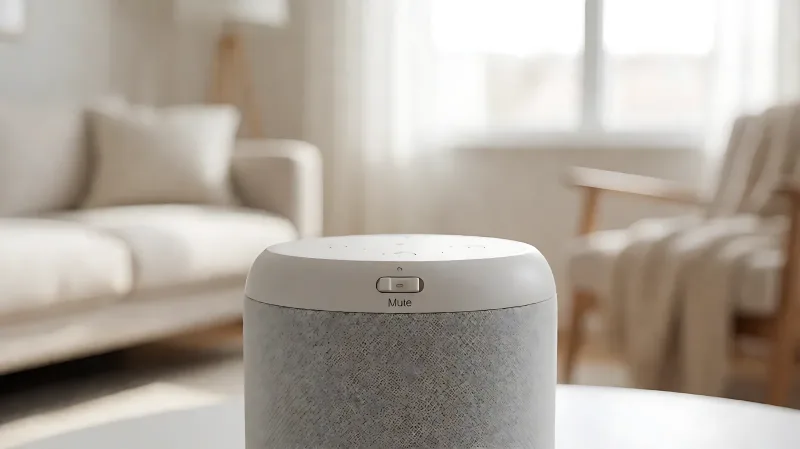
The physical mute button on a smart speaker disables the microphones, but it does not stop all data collection. Here is how to secure your voice assistant.
The physical mute button on smart speakers like the Amazon Echo and Google Nest Audio physically disconnects the microphones from the processor. This stops the device from sending voice recordings to the cloud. However, it does not stop other forms of data collection, such as internet traffic or app activity, so users must verify specific settings for total privacy.
For more information, see NIA aging in place resources from the National Institute on Aging.
How does the smart speaker mute button actually work?
Most major voice assistants, including Amazon Alexa, Google Assistant, and Apple Siri on newer models, feature a dedicated hardware switch. When you flip this switch, it creates a physical break in the electrical circuit powering the microphone array. This is distinct from software-based muting, which simply tells the processor to ignore the input. Because the connection is broken physically, the microphone cannot capture audio even if the device is compromised by malware or hacked remotely. For example, on the Amazon Echo line, the mute switch glows a solid red light to indicate that the microphones are inactive. On the Google Nest Audio, a similar slider covers the mics and triggers a red light. Apple’s HomePod lacks this hardware switch on older models, requiring users to use the app to disable the wake word, which is a software command and therefore less secure against deep threats.
What data do smart speakers collect when the mics are on?
When the microphones are active, the device is in a state of passive listening. It processes audio locally to detect the wake phrase, such as “Alexa” or “Hey Google.” Once the phrase is detected, the device records a short audio snippet and sends it to the cloud for processing. This is where significant data collection occurs. The global smart speaker market has grown significantly in recent years, driven by the integration of these devices into the smart home ecosystem. The data collected includes voice commands, which are often kept for up to 18 months or until deleted. The devices also log metadata, such as the time of use, volume levels, and specific actions taken. Surveys have consistently found that a majority of non-users in the U.S. are concerned about hacking risks, while a significant portion fears the devices are always listening. These concerns are valid because voice data is highly sensitive and can be used to train artificial intelligence models or sold to third-party advertisers if not properly managed in the privacy settings.
Can a smart speaker listen in when the mics are muted?
Generally, no. If the physical mute switch is engaged, the microphones are electrically dead. However, there are nuances. Some users worry about “false wakes,” where the device mistakenly triggers on a sound that mimics the wake word. In these cases, the recording is usually short and sent to human reviewers for quality control. The Consumer Product Safety Commission (CPSC) has not mandated specific hardware mute standards for all devices, so consumers must check the specific model. For Apple HomePod users, since the early models lacked a hardware mute switch, the device relied on software to ignore voice inputs. This means a sophisticated malware could theoretically disable that software feature. Amazon and Google have responded to these concerns by adding hardware switches to nearly all new models in recent years, prioritizing physical security over software-only solutions.
How can you secure your smart speaker beyond the mute button?
Engaging the mute button is the first step, but it is not the only one. You should regularly review the voice history in the app. On Amazon, this is found in the Alexa app under “Account Settings” and then “Voice History.” You can pause the saving of recordings or delete them in bulk. For Google, check the “My Activity” page to clear voice recordings. Additionally, segment your home network. Keep smart speakers on a separate IoT network from your personal laptops and phones. This prevents a compromised speaker from accessing your bank credentials or personal emails. Enable two-factor authentication on all accounts linked to the speaker. Finally, disable remote access if you do not need to control your lights or music while away from home. The National Institute of Standards and Technology (NIST) recommends that users treat all internet-connected devices as potential entry points for cyberattacks, emphasizing the need for strong, unique passwords and regular firmware updates.
What privacy risks remain even with hardware muting?
Even when the microphones are off, smart speakers still connect to the internet to update firmware and sync accounts. This traffic can be monitored. Furthermore, if your speaker is linked to a smart home hub, it may retain logs of actions taken when the mics were previously active. For example, if you told Alexa to “turn on the lights” before muting, that command and its context are still stored in the cloud. To fully protect your privacy, you must manually delete these historical logs. A 2025 survey of smart home users in the U.S. and U.K. indicated that while hardware muting increased trust in the device, 40% of users still felt uneasy about cloud storage. Regulators in the European Union have tightened data protection rules, requiring stricter consent and easier data deletion, but in the U.S., the Federal Trade Commission (FTC) continues to rely on self-regulation by companies. Therefore, the burden of security often falls on the user to actively manage settings.
Frequently Asked Questions
Does the mute button stop all internet traffic?
No. The mute button only disables the microphone input. The device still connects to Wi-Fi for system updates, cloud synchronization, and other background functions. To stop all traffic, you must unplug the device or disconnect it from the network in your router settings.
How often should I delete my voice history?
Security experts recommend reviewing and deleting voice history at least once a quarter. You can also enable auto-delete features in the settings of the Amazon Alexa or Google Home apps to ensure recordings are removed after a set period, such as 18 months or immediately.
Is Apple HomePod more private than Amazon Echo?
Apple emphasizes on-device processing for many Siri tasks, which can reduce cloud transmission. However, early HomePod models lacked a hardware mute switch, which is a significant drawback for users prioritizing physical security. Newer Apple speakers have improved privacy features, but Amazon and Google have been quicker to implement mandatory hardware mute switches across their entire product lines.
What do I do if I don’t have a hardware mute button?
If your speaker lacks a physical switch, use the app to disable the wake word when not in use. However, this is less secure. Consider upgrading to a model with a hardware mute switch, or use a physical switch to cut power to the device when you are in sensitive conversations.