Smart Doorbells for Seniors: Safety, Installation, and Reviews
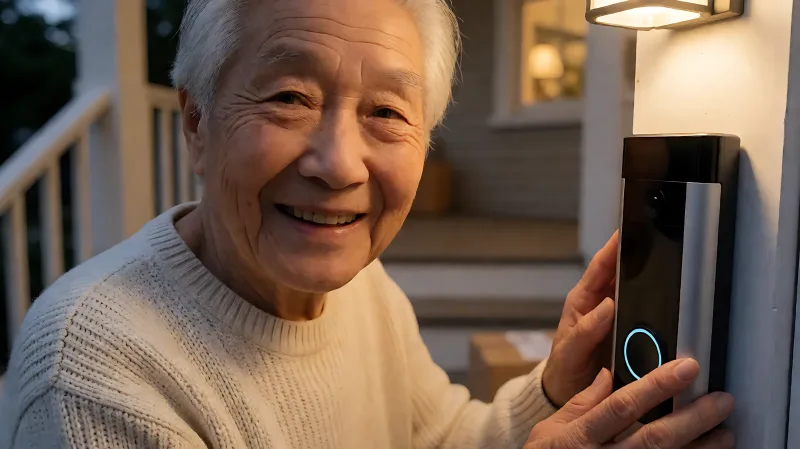
Learn how to choose a video doorbell that keeps seniors safe. This guide covers ease of installation, managing deliveries, and preventing home invasion fraud.
Smart doorbells enhance home safety for seniors by verifying visitors and securing deliveries. Choose battery-powered models with large viewing angles and local storage options. These devices reduce the risk of falls and help prevent package theft, which affects 37 percent of apartment renters according to recent consumer data.
For more information, see NIA aging in place resources from the National Institute on Aging.
What features make a doorbell senior-friendly?
When selecting a device for an older adult, prioritize simplicity and clarity. The Federal Trade Commission advises consumers to be wary of telemarketers, and a clear video image helps residents verify callers before answering. A wide field of view, ideally at least 140 degrees, allows users to see head-to-toe details without moving. Look for two-way audio that is loud and clear, as hearing loss is common among the elderly. Devices that integrate with existing smartphones or tablets ensure seniors do not need to buy new hardware. Additionally, models with motion detection that alerts family members can provide a safety net if the resident does not answer within a set time.
How do installation requirements affect senior safety?
Complex wiring can pose a tripping hazard or require climbing ladders, which increases fall risk. The Consumer Product Safety Commission (CPSC) emphasizes that ladders are a leading source of injury in home improvement. Battery-powered doorbells avoid this risk by using a simple adhesive mount or screw-in base that can be installed at waist height. For wired options, professional installation is recommended to ensure electrical safety and proper alignment. Renters in apartment buildings should check lease agreements, as many landlords permit battery doorbells that do not damage the exterior. A peephole-style camera is another option that replaces the existing view, requiring no electrical work.
Is a wired or wireless model better for seniors?
Wireless models offer greater flexibility and are generally safer for DIY installation. However, they require periodic battery recharging or replacement. Wired models provide continuous power but demand electrical knowledge. For seniors with limited mobility, a wireless unit mounted at a comfortable height is usually the superior choice. If a home has existing doorbell wiring, a hybrid model can be powered by the existing low-voltage system, eliminating battery maintenance entirely.
How do smart doorbells prevent package theft?
Package theft, or porching, is a common crime in the United States. A video doorbell acts as a deterrent because thieves prefer unobserved locations. The camera records high-definition footage, which can serve as evidence for police or insurance claims. Many modern devices, such as the Swann EVO model, use local storage via microSD cards. This approach keeps data private and avoids monthly subscription fees, a significant benefit for seniors on fixed incomes. Cloud storage services, like Ring Protect or Nest Aware, offer remote access and longer history but add a recurring cost. The National Crime Prevention Council recommends keeping packages inside if possible, but a doorbell allows for remote verification and immediate response if a delivery driver is at the door.
What is the role of artificial intelligence in these devices?
Artificial intelligence, or AI, improves detection accuracy by distinguishing between people, animals, and vehicles. This reduces false alarms caused by wind or shadows. Some advanced models feature voice assistants that can talk to visitors when the senior is busy or away. This is particularly useful for refusing unwanted sales calls or verifying delivery drivers without opening the door. The presence of a talking AI can scare off bad actors who know the resident is not alone. However, users should be cautious about sharing personal information with the device, as data privacy is a concern raised by the Electronic Privacy Information Center.
Which brands offer the best value and security?
The market offers several reputable options with varying features and price points. The following table compares leading models for senior users, focusing on price, power, and storage.
| Brand / Model | Estimated Price (USD) | Power Source | Storage Options | Best Feature |
|---|---|---|---|---|
| Swann EVO | $59 - $79 | Battery or Wired | Local (MicroSD) | AI Voice Assistant |
| Ring Battery | $60 - $90 | Battery | Cloud Subscription | Chime Integration |
| Eufy Video | $99 - $159 | Battery or Wired | Local (Base Station) | No Monthly Fees |
| Nest Hello | $180 - $220 | Wired | Cloud Subscription | Smart Alerts |
Swann offers a strong value proposition with its EVO series, which includes a 140-degree viewing angle and night vision. The ability to store clips locally on a microSD card is a major selling point for privacy-conscious users. Ring provides a robust ecosystem for those who already use Alexa or other smart home devices. Eufy is popular for eliminating subscription costs, making it a predictable expense for long-term use. Nest commands a premium price but offers superior build quality and deep integration with Google services.
How to install a doorbell safely at home
Follow these steps to ensure a safe and effective installation. First, choose a location that is not in direct sunlight or rain to prevent weather damage. The ideal mounting height is approximately 48 inches from the ground. Use a level to ensure the device is straight. For battery models, charge the battery fully before installation. Secure the base plate with screws if on a wooden surface, or use strong adhesive strips on metal or stucco. Connect the unit to the Wi-Fi network using the companion app. Set up motion zones to avoid detecting traffic on the street, which causes unnecessary notifications.
What tools are needed for setup?
Most battery doorbells require only a screwdriver or an adhesive strip. Wired models may need a low-voltage test tool to check existing connections. A step ladder is often needed to reach the door frame, so ensure it is stable on a flat surface. Never install the device if the weather is wet or windy. If the installation feels too difficult, hire a professional electrician. The cost for a professional install is typically between $50 and $100, which is a worthwhile investment for safety.
Frequently Asked Questions
Can a smart doorbell work without an internet connection?
Most smart doorbells require Wi-Fi for cloud storage and mobile app access. However, some models, like the Eufy and Swann EVO, can store video locally on a microSD card or base station. This allows for offline recording, though remote viewing from a phone is not possible without a network connection.
How much does it cost to maintain a video doorbell?
Initial costs range from $60 to $220 depending on the brand. Ongoing costs depend on the storage method. Local storage has no recurring fees, while cloud subscriptions cost between $3 and $10 per month. Battery replacement or recharging is a minor expense for wireless models. Plan for a total annual cost of $50 to $150 if using local storage.
Is it legal to record visitors with a doorbell camera?
Recording visitors in your own doorway is generally legal in the United States. However, recording common areas like a hallway in an apartment building may violate privacy laws or building codes. Check local state laws and apartment regulations before installing a device in a shared space. Avoid directing the camera into a neighbor's property.