Smart Lock Battery Failure Backup Plan
A dead smart lock battery is a common lockout risk. This guide explains how to use manufacturer-approved backup methods like physical keys and emergency power contacts to regain access safely without forcing the door.
If your smart lock battery dies, use the model-specific physical key or emergency power contacts to regain access. Do not pry or drill. Replace the full battery set from the secure side and test the mechanism with the door open. According to the Consumer Financial Protection Bureau, having a verified backup method is the fastest way to avoid costly locksmith services.
Why Your Smart Lock Might Fail Despite Warnings
Smart locks are battery-powered to ensure functionality during grid outages, but this design creates a predictable drain pattern. Most residential locks run on four AA batteries, though some use eight or rechargeable packs. The constant background drain comes from three main sources: the radio standby mode (Wi-Fi locks drain faster than Z-Wave or Zigbee models), keypad backlighting, and motor torque. If your door is misaligned or weatherstripping is thick, the motor works harder, significantly shortening battery life. Many households assume that a 10 percent low-battery alert provides ample time, but in fact, a misaligned door can cause a full battery set to deplete in weeks rather than months.
How Do You Regain Access When the Lock Is Dead?
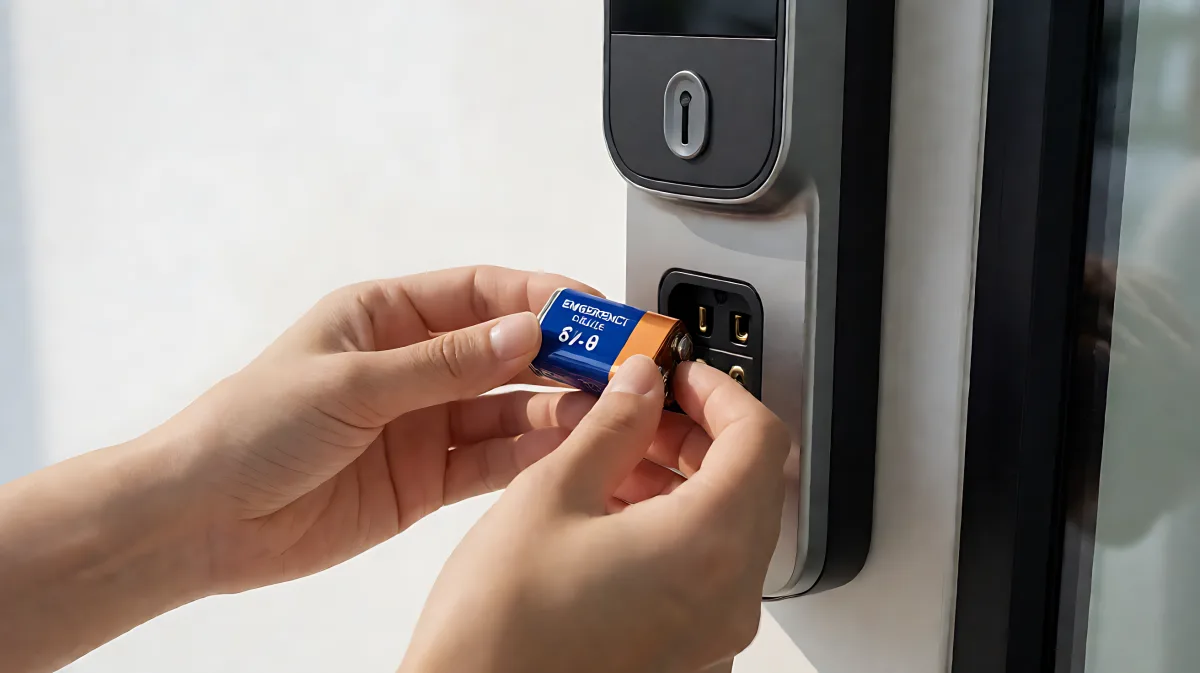
Your options depend on your specific model, but the order of operations is always the same: start with the least destructive method. The majority of smart deadbolts from brands like Kwikset, Schlage, Yale, and August include a traditional key cylinder. The keyhole is often hidden under the bottom of the lock’s interior escutcheon or behind a small exterior cap. This is the fastest fix and requires zero tools. If you do not have a key, look for a small circular contact point on the bottom of the exterior keypad, usually marked with a battery icon. Pressing a 9V battery against these contacts provides temporary power for one or two unlock cycles. Newer Matter-over-Thread and Wi-Fi locks may include a USB-C emergency port, allowing you to connect a power bank for a stable power supply while you replace the internal batteries.
When Should You Call a Professional?
If your lock does not have a key, 9V contacts, or USB-C port, or if the motor is jammed, call a licensed locksmith. In the United States, a locksmith can typically open most smart locks in under ten minutes. Expect to pay between $75 and $200 depending on the time of day and lock complexity. Do not attempt to pry the escutcheon or drill the lock, as this often voids warranties and damages the door. If you hear grinding noises or smell burnt electronics, stop and call for help.
How Do You Prevent Future Battery Failures?
Prevention is better than emergency response. Set a calendar reminder to replace batteries every six months, rather than waiting for a warning. Always replace the complete set of batteries; mixing old and new cells causes uneven drain and can trigger false low-battery errors. If your Wi-Fi lock drains batteries in three to six months, consider switching to a Z-Wave or Zigbee model, which can stretch battery life to six to twelve months. Monitor your lock’s battery percentage through your home hub. For instance, a Z-Wave lock on Home Assistant can display a precise percentage trend, whereas a Wi-Fi lock on Amazon Alexa may only show a generic "Low Battery" status when power is critical.
Common Mistakes and How to Avoid Them
Many homeowners assume that the app will always help them get in. In reality, if the lock is dead, it cannot communicate with your phone or hub. The app will show "Offline" and offer no unlock path. Another misconception is that emergency power automatically unlocks the door. It does not. It only supplies enough energy for you to present a valid credential, such as a code, key, or fingerprint. Never store your physical key in an obvious place like a flower pot or under a mat. Keep it secured but accessible, such as in a car or with a trusted neighbor. For shared properties or rentals, assign a specific person to receive battery alerts and test the backup method quarterly.
- Identify your lock's backup method: key, 9V contacts, or USB-C port.
- Store spare batteries and a 9V battery in a secure, accessible location.
- Test the physical key or emergency power method with the door open.
- Replace all batteries simultaneously and inspect for corrosion.
- Record the model number and support contacts in a digital and paper file.
What If Your Lock Drains Batteries Quickly?
If your lock eats through batteries faster than the manufacturer's specification, the hardware is reporting a condition. Investigate door alignment, strike plate fit, and hinge wear. A binding bolt forces the motor to work harder, draining power rapidly. Weather exposure and extreme temperatures can also impact performance. If you notice swelling, leakage, or heat from the battery compartment, stop use and contact support. Do not ignore fast drain; it is a sign of underlying mechanical or environmental stress, not just normal wear.
FAQs About Smart Lock Battery Backup
Will a smart lock work during a power outage?
Yes, the lock itself runs on internal batteries. However, remote features like app control and notifications may stop if the hub or Wi-Fi network is also affected. Local keypad, key, or Bluetooth access should still work if the lock has power.
Does external emergency power unlock the door automatically?
No. Temporary power only energizes the lock so that you can use a valid credential, such as a code or key. It does not bypass authentication. If the motor is jammed, the keypad may light up, but the bolt will not move.
Should I keep a 9-volt battery outside the house?
Only if your specific lock model uses that backup method. Store it securely, protect the terminals from corrosion, and check the expiration date periodically. Do not store it with access codes or keys to maintain security layers.
What should I do if I have no key and no emergency contacts?
Call a licensed locksmith or building manager. Do not attempt to force entry or use unverified internet tricks. If someone is trapped inside and cannot exit, treat it as a life-safety emergency and call 911.