Clearer TV Dialogue For Seniors: Practical Hearing Fixes
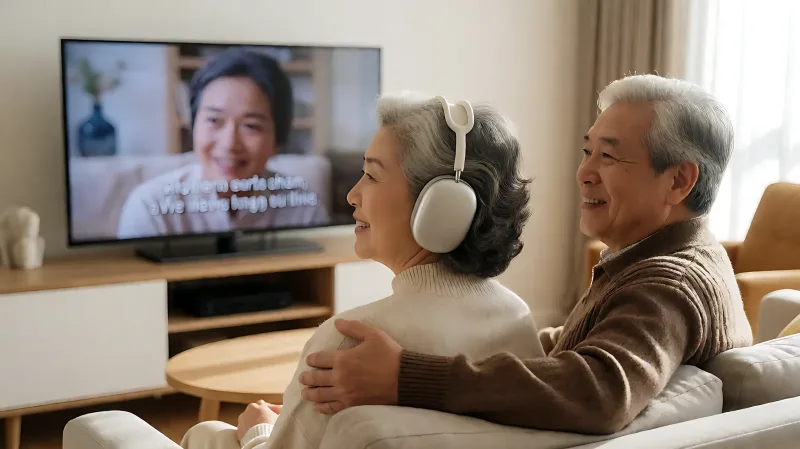
Modern TVs are thin but their speakers are often poor, making dialogue hard to hear. Learn how to boost clarity using built-in settings, captions, and assistive listening devices tailored for seniors with hearing loss.
To improve TV dialogue clarity for seniors with hearing loss, start by activating the television's built-in 'Clear Voice' or 'Dialogue Boost' settings and enabling closed captions. Combine these with an equalizer adjustment that lowers bass and boosts mid-frequencies to make speech stand out from background music. For significant hearing loss, consulting an audiologist about hearing aids or dedicated assistive listening systems can provide targeted amplification without disturbing others in the room.
Why does modern TV dialogue sound muffled to older adults?
Television design has shifted dramatically over the last decade. Manufacturers prioritize ultra-thin bezels and sleek aesthetics, which forces the use of small, downward-firing speakers. This physical limitation means sound often bounces off the floor or back of the unit before reaching the listener. For a senior with age-related hearing loss, this muffled audio becomes even harder to decipher, particularly when background music or sound effects compete for attention. It is not just a volume issue; it is a clarity problem.
AARP reports that approximately 48 million Americans have some degree of hearing loss. This includes about one-third of people aged 65 to 74 and nearly half of those over 75. This widespread condition explains why so many households struggle with TV dialogue. The issue is compounded by how movies are mixed. Sound engineers design audio for large theater systems, creating a wide dynamic range that home speakers cannot replicate. When that audio is compressed onto a standard TV, voices can become indistinct compared to explosions or music.
Which free TV settings can boost speech clarity?
Before purchasing new equipment, explore the settings menu on your current television. Most modern displays include audio processing tools designed to enhance specific frequency ranges. These adjustments are often underutilized but can make a significant difference in comprehension.
How do I enable dialogue boost features?
Navigate to the audio or sound menu on your TV remote. Look for options labeled 'Clear Voice,' 'Dialogue Enhance,' 'Speech Enhancement,' or 'Voice Boost.' Enabling these settings instructs the TV to process the audio stream to prioritize human voice frequencies over background noise. Consumer Reports notes that many viewers with hearing difficulties find this the most effective free solution. It does not simply turn everything louder; it selectively amplifies the mid-range frequencies where human speech resides.
What is the best equalizer setting for hearing loss?
If your TV offers an equalizer or EQ, you can manually tune the sound profile. A helpful strategy is to lower the bass and low-mid frequencies, which often carry rumbles and environmental noise. Then, slightly increase the upper-mid and high frequencies. Human voices generally sit in this higher range. Experimenting with these sliders can help cut through the 'background wash' that often makes dialogue unintelligible. Some TVs also have a 'Night Mode' that levels volume. While this prevents sudden loud noises, it can sometimes compress the audio too much, making voices sound tinny. It is worth testing both on and off to see which setting provides the best balance for your specific hearing profile.
Do closed captions help seniors with hearing loss?
Closed captions (CC) are a highly effective tool for confirming what you are hearing. The Federal Communications Commission requires most broadcasters and streaming services to provide captions. For many seniors, captions act as a backup for moments when accents are thick, characters are mumbling, or background noise is overwhelming. Statistics suggest that nearly half of all Americans use captions, often for clarity rather than language support. Enabling this feature is usually as simple as pressing the 'CC' button on the remote or navigating to the accessibility settings in the TV menu.
How do hearing aids and assistive listening devices improve TV sound?
For individuals with moderate to severe hearing loss, software settings may not be enough. Hearing aids can be programmed specifically for television listening. Many modern hearing aids use directional microphones and noise reduction algorithms to isolate speech. However, you can also use dedicated assistive listening devices.
These systems typically involve a remote that you hold or wear, which picks up the TV audio wirelessly and transmits it directly to your hearing aids or specialized headphones. This bypasses the room entirely, providing a direct, clean audio feed without competing with background noise or other speakers in the room. Organizations like the National Association of the Deaf often recommend these systems for social situations where you want to hear clearly without raising the volume for others. It is advisable to consult with a hearing professional who can test different devices and recommend the solution that fits your specific audiogram.
What home environment changes can support better listening?
Room acoustics play a surprising role in how well you hear TV. Hard surfaces like tile floors, bare walls, and glass windows can create echoes that muddy sound waves. Adding soft furnishings such as thick rugs, heavy curtains, or upholstered furniture can absorb sound reflections, reducing the 'echo' effect and making dialogue sound crisper. Positioning the television so that it is at ear level when seated can also help, as this places the small speakers in a more direct line with your ears. If possible, avoid placing the TV against a hard wall, which can reflect sound back into the room and distort the audio profile.
When should a senior consult a hearing professional?
If you find that you are regularly shouting to others in quiet rooms, turning up the TV to a level that bothers family members, or frequently asking people to repeat themselves, it is time for a professional evaluation. An audiologist can perform a comprehensive hearing test to determine the type and severity of your loss. This diagnosis is crucial because it informs which technology will actually help. For some, over-the-counter amplifiers are sufficient, while for others, custom-fitted hearing aids with T-coil compatibility for TV loops are necessary. A professional can also check for non-auditory causes of difficulty, such as brain processing issues that affect how you separate speech from noise.
FAQ
Are there specific brands of TV hearing devices that work with most hearing aids?
Yes, several reputable brands, such as StreamTV or the integrated Bluetooth pairing features in many modern hearing aids, allow direct connectivity to televisions. This eliminates the need for separate remote receivers in many cases. Check with your hearing aid manufacturer for compatible models and pairing instructions.
Will enabling 'Clear Voice' settings distort the sound for other listeners?
It is rare, but some listeners may find the processed audio sounds slightly artificial or 'thin' if the boost is set to the maximum level. Most TVs allow you to adjust the intensity of the dialogue boost, so you can find a balance that clarifies speech without making the overall experience unpleasant for others in the room.
How much do assistive listening systems for TV usually cost?
Basic infrared or radio frequency assistive listening systems can range from approximately $50 to $300 depending on the brand and features. More advanced wireless systems that integrate directly with hearing aids or offer multi-room support can cost upwards of $500. Many hearing centers offer demo units so you can test them in your home environment before buying.
Do streaming services like Netflix have better audio for hearing loss than live TV?
Streaming services often offer a wider dynamic range, which can make dialogue harder to hear if it is mixed very quietly against loud effects. However, most streaming apps include audio processing options similar to built-in TV settings. Additionally, they often provide superior caption quality and accuracy compared to broadcast television, which can be a significant advantage for comprehension.